
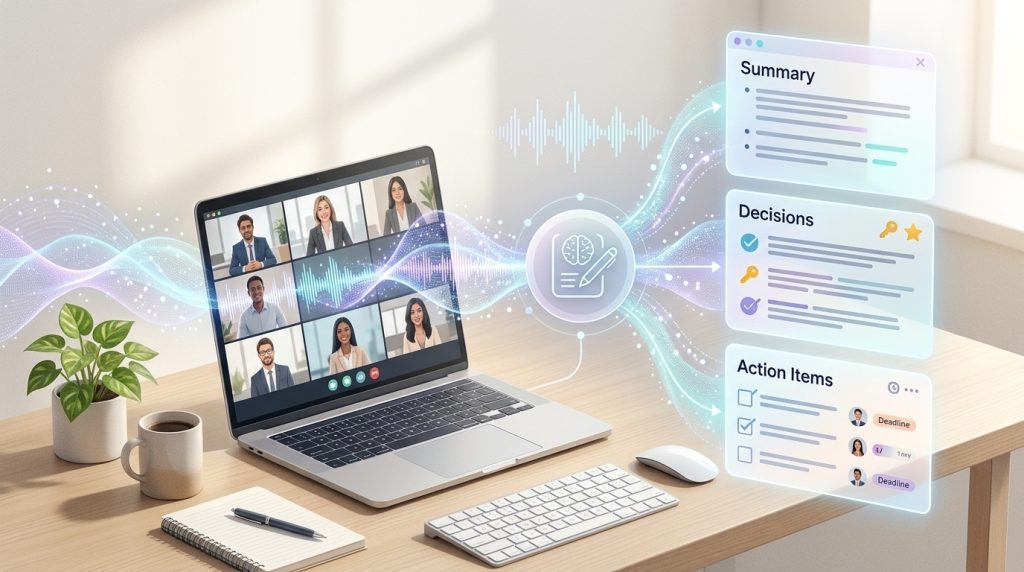
Taking notes during a meeting sounds simple until the conversation gets fast, several people start talking, and you realize you missed an important decision.
An AI note taker can solve much of that problem. These tools can listen to meetings, create transcripts, identify speakers, summarize important points, and turn conversations into action items or follow-up tasks.
The best choice depends on how you work. Some tools are built around Zoom, Google Meet, and Microsoft Teams. Others focus on natural-looking notes, cross-meeting search, or connecting meeting information to your existing productivity tools.
Best AI Note Takers in 2026 at a Glance
| Tool | Best for | Free option | Key strength |
|---|---|---|---|
| Fathom | Individuals and free users | Yes | Unlimited recording and transcription |
| Otter.ai | Live transcription | Yes | Real-time notes and speaker identification |
| Fireflies.ai | Teams and meeting workflows | Yes | Transcription, summaries, integrations |
| Granola | Natural meeting notes | Yes | Notes without relying entirely on a meeting bot |
| tl;dv | Teams and multilingual meetings | Yes | Transcription and AI meeting notes |
These recommendations are based on current published features, free-plan availability, integrations, and intended use cases rather than a claim that one tool is universally the best.
What Is an AI Note Taker?
An AI note taker is software that uses speech recognition and artificial intelligence to turn a spoken meeting into useful written information.
Depending on the tool, it may:
- Record or capture meeting audio
- Transcribe conversations
- Identify speakers
- Create an AI-generated summary
- Extract decisions and key points
- Create action items
- Let you search previous meetings
- Generate follow-up emails
- Connect meeting information with other applications
The basic workflow is straightforward: meeting → transcription → AI processing → organized notes.
The important distinction is that not every AI note taker works in exactly the same way. Some join your online meeting as a visible bot, while others use a desktop application, browser extension, or device microphone to capture the conversation.
1. Fathom — Best Free Option for Many Individual Users
Fathom is particularly interesting if you want to record and transcribe meetings without immediately paying for the service.
Fathom’s current free plan includes unlimited recordings and storage, unlimited transcription, and advanced AI summaries for the first five calls each month. After that, free users still have access to the standard/general summary experience.
It supports major meeting platforms including Zoom, Google Meet, and Microsoft Teams. Fathom also provides features such as AI action items, follow-up emails, searchable meeting information, and integrations on its paid plans.
Best for: Individuals, freelancers, consultants, and people who have frequent online meetings.
Watch out for: Advanced AI features are more limited on the free plan.
Why choose it: If your priority is recording and transcribing a large number of meetings without a monthly recording quota, Fathom is a strong starting point.
2. Otter.ai — Best for Live Transcription
Otter.ai is one of the more established names in AI meeting transcription.
Its current free Basic plan includes 300 monthly transcription minutes, live transcription, speaker identification, meeting support for Zoom, Microsoft Teams, and Google Meet, plus three lifetime audio/video file imports.
The paid Pro plan increases transcription capacity and adds features such as advanced AI workflows, longer meetings, more imports, advanced search, and additional integrations.
Best for: Students, professionals, researchers, and anyone who wants to see a meeting transcript as the conversation happens.
Watch out for: The free plan has meaningful monthly transcription limits.
Why choose it: Otter is a good fit when live transcription and speaker identification matter as much as the final summary.
3. Fireflies.ai — Best for Teams and Meeting Workflows
Fireflies.ai goes beyond basic meeting summaries by combining transcription with search, AI assistance, integrations, and workflow features.
Its current free plan includes unlimited transcription, limited AI summaries, 400 minutes of storage per team, 20 AI credits, support for major meeting platforms, real-time notes, meeting search, and the AskFred AI assistant.
Paid plans add unlimited AI summaries, more storage, meeting recordings, downloads, task management, additional integrations, analytics, and team-oriented controls.
Best for: Teams, sales professionals, customer-success teams, and businesses that want meeting information connected to their workflows.
Watch out for: The free plan has limits on AI summaries and storage.
Why choose it: Fireflies becomes especially useful when meeting notes need to become part of a larger business workflow rather than simply a document you read after the call.
4. Granola — Best for More Natural Meeting Notes
Granola takes a somewhat different approach to meeting notes.
Its current Basic plan is free and provides AI meeting notes, limited meeting history, AI chat across meetings, shared folders, customized note templates, and multilingual support. The Business plan adds unlimited meeting history, advanced AI features, integrations, MCP support, and API access.
Granola is particularly interesting for people who care about the quality and structure of the notes, rather than simply receiving a raw transcript.
Best for: Professionals who want structured notes that fit naturally into their existing workflow.
Watch out for: The free plan has limited meeting history.
Why choose it: It is worth considering if conventional meeting bots feel too intrusive or you want a more note-focused workflow.
5. tl;dv — Best for Multilingual Meeting Workflows
tl;dv combines meeting recording, transcription, AI notes, and workflow automation.
Its current free plan includes unlimited video recordings and transcription in more than 100 languages, along with 10 meetings with AI notes and 10 Ask AI queries. The Pro plan adds unlimited AI notes, custom note templates, action-item assignment, global transcript search, integrations, and other advanced capabilities.
Best for: International teams, multilingual meetings, and organizations that want meeting information connected to other applications.
Watch out for: Some of the more advanced AI functionality is reserved for paid plans.
Why choose it: The free transcription allowance and broad language support make it attractive for people working across languages and time zones.
How to Choose the Right AI Note Taker
Don’t choose an AI meeting assistant based only on the number of features listed on its homepage.
Consider these questions first:
1. How do you capture meetings?
Does the tool join Zoom, Google Meet, or Teams as a meeting bot? Does it use a desktop application? Can it capture in-person conversations?
Your preferred workflow matters.
2. How much transcription do you need?
If you have only a few meetings each month, a limited free plan may be enough. If you have several hours of meetings every week, check transcription and storage limits carefully.
3. Do you need action items?
A transcript is useful, but a good summary should help answer:
- What was decided?
- Who is responsible?
- What needs to happen next?
- When is it due?
If those answers are important to your work, prioritize tools with structured action-item features.
4. Where will the notes go?
Think about your existing workflow. You may want meeting information inside a CRM, Notion workspace, Slack channel, project-management system, or another application.
5. What happens to your meeting data?
Meeting transcripts can contain confidential business information, customer details, financial information, personal information, or internal discussions.
Before recording, review the tool’s privacy and data-retention policies. Also make sure your organization and meeting participants are comfortable with the recording.
Privacy and Consent Matter
An AI note taker is not just another productivity app. It may process everything people say during a meeting.
Before recording, check whether participants need to be notified or provide consent under the laws and policies applicable to your situation.
For example, Fathom provides controls for sharing recordings and summaries, while its documentation explains that recordings can remain stored until manually deleted.
Zoom’s Meeting Summary documentation also explains that its AI summary uses speech-to-text data and that certain AI features may send meeting transcript information to third-party model providers. Zoom states that customer audio, video, chat, screen-sharing content, attachments, and other communications-like content are not used to train Zoom’s or third-party AI models for its AI features.
The practical rule is simple: don’t record sensitive conversations automatically just because the software makes it easy.
How to Get Better AI Meeting Notes
AI can summarize a messy conversation, but you will usually get better results when the meeting itself has some structure.
At the beginning of an important meeting, identify the goal. During the conversation, clearly state decisions and responsibilities.
For example:
“Decision: We will publish the new landing page on Friday. Sarah will provide the final copy by Wednesday, and Ahmed will handle the deployment.”
That sentence is much easier for an AI system to turn into a useful action item than a vague discussion about what might happen.
After the meeting, review the summary before forwarding it. AI transcription and summarization can make mistakes, particularly with names, technical terms, numbers, accents, overlapping speech, or unclear conversations.
Common Mistakes to Avoid
Using an AI summary without checking it: Treat the summary as a draft of the meeting record, not an unquestionable source of truth.
Ignoring consent: Make sure participants know when a meeting is being recorded or transcribed when required.
Choosing based only on the free plan: Check storage, transcription limits, AI-summary limits, integrations, and export options.
Recording every meeting: Not every conversation needs a permanent transcript.
Expecting AI to understand everything perfectly: Technical jargon, names, numbers, and overlapping speakers can still create errors.
Final Recommendation
There isn’t one AI note taker that fits every meeting workflow.
For a generous free starting point, Fathom is worth considering. For live transcription, Otter.ai is a strong option. Teams looking for workflow automation and integrations may prefer Fireflies.ai. Granola is interesting for users who prioritize natural, structured notes, while tl;dv stands out for multilingual meeting workflows.
The best approach is to choose based on how you capture meetings, how much you meet, where your notes need to go, and how sensitive your conversations are.
Most importantly, remember what an AI note taker is actually there to do: reduce the amount of information you have to manually capture so you can pay more attention to the conversation itself.
FAQs
Is an AI note taker free?
Many AI note takers offer free plans, but the limits vary. Fathom currently offers unlimited recordings and storage on its free individual plan, while Otter’s free plan provides 300 transcription minutes per month. Fireflies and tl;dv also have free options with different AI and storage limitations. help.fathom.video
What is the best AI note taker in 2026?
It depends on the workflow. Fathom is a strong free option for individuals, Otter.ai is well suited to live transcription, Fireflies.ai is useful for business workflows, Granola focuses heavily on AI-assisted notes, and tl;dv is useful for multilingual meetings.
Can an AI note taker record Zoom meetings?
Yes. Several popular tools support Zoom, including Fathom, Otter.ai, Fireflies.ai, and tl;dv. Zoom itself also offers AI Meeting Summary for eligible plans. fathom.video
Can AI note takers work with Google Meet and Microsoft Teams?
Yes. Many leading tools support both platforms. However, the exact capture method and available features can differ between services, so check the tool’s current documentation before choosing one.
Are AI meeting summaries accurate?
They can be very useful, but they are not guaranteed to be perfect. Transcription and summarization can misinterpret names, numbers, technical terms, accents, or overlapping speech. Important decisions and action items should be reviewed before being treated as official records.
Is it safe to use an AI note taker?
Safety depends on the specific service, settings, data-retention policies, and type of information being recorded. Review the provider’s privacy and security documentation before using an AI note taker for confidential meetings.
Do I need permission to record a meeting?
Recording requirements depend on applicable laws, company policies, the meeting platform, and where participants are located. When in doubt, clearly notify participants and follow the applicable consent requirements rather than recording secretly.
Can AI note takers create action items?
Yes. Several tools can extract action items from meetings. Fathom, for example, includes AI action-item functionality, while Fireflies and tl;dv provide action-item and workflow features on their plans. help.fathom.video
Conclusion
AI note takers can turn a meeting from something you have to remember into something you can search, review, and act on later.
For most individuals, start with a free plan and see whether the tool fits your meeting workflow before paying. Compare transcription limits, AI-summary allowances, integrations, privacy controls, and storage rather than choosing based solely on the number of features advertised.


